Alexa-NLC Integration
Overview
This application illustrates how IBM Watson services can be used in an Alexa Skill to supply context in response to an intent. Here we feature the IBM Watson Natural Language Classifier. Other services which may be similarly employed include Natural Language Understanding, Tone Analyser, Discovery, Personality Insights, and Assistant.
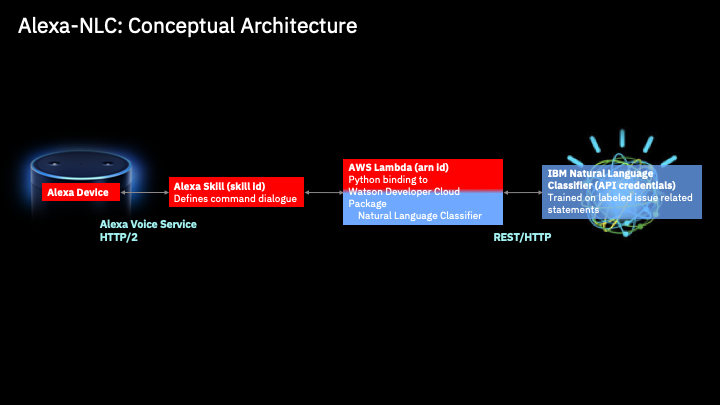
Conceptual Architecture
Alexa - IBM NLC Build Steps
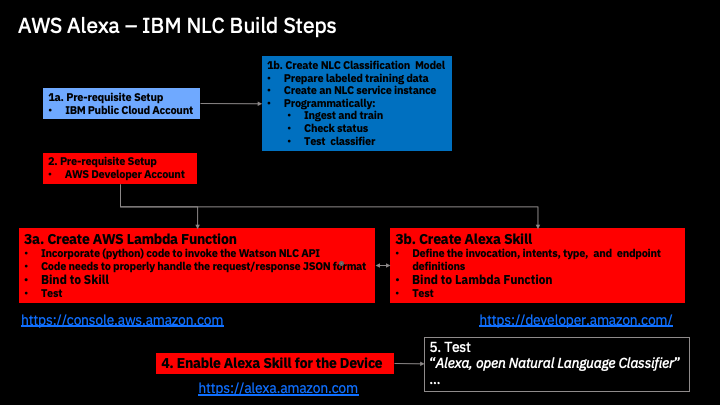
Pre-requisites
You must have an Alexa device and access the Amazon Alexa app ( https://alexa.amazon.com )used to manage Alexa devices.
Download or clone the repository before proceeding to ensure these assets are available for use in subsequent steps.
-
NLC.ipynb - Python Jupyter notebook used to build and test an IBM Watson Natural Language Classifier instance
-
labeled_phrases.csv - data used to train a natural language classifier
-
metadata.json - used by the natural language classifier in the training process
-
Archive.zip - contains Python code used to define an AWS Lambda function
Step 1: Create NLC Classifier



Step 2: Amazon Account Setup

Step 3a: Create AWS Lambda Function

Step 3b: Create Alexa Skill

Step 4: Run the Application
Verify Lambda Function and Alexa Skill Bindings

Note: You must save and run a build each time you make a change to the Skill definitions.

Additional Resources
IBM Cloud Catalog
- IBM Cloud Catalog (Open with CTL+Click to bring up catalog in separate window. )
Tutorials & Guides
-
Codecademy: Learn Alexa - Learn how to build an Alexa Skill from within your browser with this beginner friendly tutorial on Codecademy!
-
Official Alexa Skills Kit Documentation - Official Alexa Skills Kit Documentation